Showing posts with label Pep Ventosa. Show all posts
Wednesday, 4 March 2020
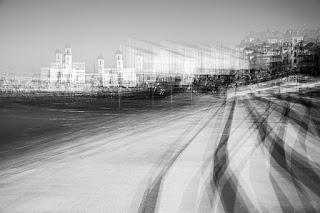
Margate Multiple Exposures
While we were on the beach I could not resist taking some multiple exposures.
Saturday, 1 February 2020
In Camera Pep Ventosa
People who look at my blog or my instagram feed will be aware that I am currently hooked on In-camera Multiple Exposures. In the past I have created 'so-called' Pep Ventosa Images by combining multiple images in Photoshop. While we were at Anglesea Abbey today I tried something I have been thinking about, and that is using the 'In Camera' Multiple Exposure Function of my Canon EOS R. To create a Pep Ventosa Image. Pep Ventosa images involve you taking a photo then moving slightly and then taking another photo and then repeating, either by walking round the object or in a straight line.
Generally the final image is made up of over 25 images. Combination of the files in Photoshop and working on each layer with obacity and blending mode.
The Canon EOS R has four blending modes and I took 5 pictures of the front of Anglesea Abbey using three of the modes. (Average, Dark and Bright)
The Four Camera Modes are:-
1. Additive which I seldom use. You have to work out in advance the exposure compensation you need. This pre-supposes you know where the photograph is going :)
2. Average, where the camera works out the exposure according to the number of shots you are combining. In fact most Canon DSLR's have these blending modes built in.
3. Dark and
4. Bright
With these two modes the Dark (or Bright) of the start image and the subsequent images that are added are compared at the same point on the sensor and the the Dark Bit (Bright Bit) will be left in the picture. In addition to this the colours that are overlapping may be mixed depending upon the darkness ration (brightness ratio) of the added images.
'Clear as Mud' :)
Ignoring the picture above this is only there for Facebook to look okay.
The 1st Image below is AverageMode, The 2nd Dark Mode and the 3rd Bright mode. These combination images where imported into Adobe Lightroom and 'Basic Adjustments made.
I have the camera set to save all images, not just the resulting Multiple Exposure and using these images I created a normal Pep Ventosa Image in Photoshop, adjusting each layer and opacity. 4th Image below
For this exercises all image layers where left at Normal Blend Mode. If you are interested the final image (Image 8) on this blog is a clip of the photoshop Layers panel.
Images 5, 6 and 7 are the same images in monochrome.
A final word about the camera I used.
The Canon EOS R is a full frame Mirrorless Camera. The advantage of using any mirrorless camera with this technique is that you can 'see' how your photos align up in the viewfinder.
With my DSLR, the Canon 5Dmkiv, I have to use Live view on the rear screen. Although this is possible I do find looking through the viewfinder a big advantage creatively and particularly in sunlight where the rear screen on a DSLR cannot always bee seen.
![]() |
| Image 1 - Additive Blend Mode in Camera |
![]() |
| Image 2 - Dark Blend Mode in Camera |
![]() |
| Image3 - Bright Blend Mode in Camera |
![]() |
| Image 4 Created in Photoshop |
![]() |
| Image 5 - Additive Blend Mode in Camera - Mono Version |
![]() |
| Image 6 - Dark Blend Mode in Camera - Mono Version |
![]() |
| Image 7 - Bright Blend Mode in Camera - Mono Version |
Thursday, 25 July 2019
Swings Multiple Exposure
A couple of Wednesdays ago I was left in charge of Beanie for the day. After taking Aiden to school we decided to go to the play park.
I did not have any intension of taking photos and I only had my Sony RX100 mkiv with me. While she enjoyed the rides (the girl has no-fear) I though I might do a bit of high speed capture with the intension of blending the images together in Photoshop (a bit like the 'in the round' images I have been playing with)
The RX100 has quite a fast motor drive and I was surprised how may shots came from each short exposure.
In Photoshop I played with different Smart Object Stack Modes and different blending modes. Fascinating subject.
I did not have any intension of taking photos and I only had my Sony RX100 mkiv with me. While she enjoyed the rides (the girl has no-fear) I though I might do a bit of high speed capture with the intension of blending the images together in Photoshop (a bit like the 'in the round' images I have been playing with)
The RX100 has quite a fast motor drive and I was surprised how may shots came from each short exposure.
In Photoshop I played with different Smart Object Stack Modes and different blending modes. Fascinating subject.
Thursday, 23 May 2019
Multiple Exposure - In camera (mostly)
With the exception of the first two photos these images where created as in camera multiple exposures.
The first two images are 'in-the-round' photos (aka Pep Ventosa)
The rest are in-camera multiple exposures. The beauty of the Canon system is that you can save the individual files as well as the in camera composite. This means that your creative concept can be worked on while you are out and IF it does not blend together nicely (personal taste) then you get a second crack at it. There are a couple here where I felt they needed a different result and these where processed in Photoshop.
The first two images are 'in-the-round' photos (aka Pep Ventosa)
The rest are in-camera multiple exposures. The beauty of the Canon system is that you can save the individual files as well as the in camera composite. This means that your creative concept can be worked on while you are out and IF it does not blend together nicely (personal taste) then you get a second crack at it. There are a couple here where I felt they needed a different result and these where processed in Photoshop.
![]() |
| In the Round |
![]() |
| In the Round |
![]() |
| In Camera Multiple Exposure |
![]() |
| Photoshop File |
![]() |
| In Camera Multiple Exposure |
![]() |
| Photoshop File |
![]() |
| In Camera Multiple Exposure |
![]() |
| In Camera Multiple Exposure |
![]() |
| In Camera Multiple Exposure |
Tuesday, 21 May 2019
Grey Day in Clevedon
At the end of March a few of us from the Cambridge Camera Club took a trip to North Somerset. We where staying in Weston-super-Mear. On the trip down Sue and I visited Clevedon. A beautiful seaside town. We had problems at first parking as the car park was shut !! due to filming. HayHo we found some on street parking which was closer to the pier anyway.
The Pier has the reputation of being 'The Most Beautiful Pier in England' (ref Sir John Benjaman , and celebrates its 150th Birthday this year. I must admit it was not a disappointment.It was completed in 1869.
In 1970 disaster struck when the end two sections collapsed under Insurance Load Testing. The initial plan by the local council was to demolish the pier. Both the Pier Preservation Trust and the Pier Supporters Club where set up in 1972 and it was only through their efforts and lottery funding etc that the pier was saved. It reopened in 1998.
You can read about the history of the pier HERE
The Pier has the reputation of being 'The Most Beautiful Pier in England' (ref Sir John Benjaman , and celebrates its 150th Birthday this year. I must admit it was not a disappointment.It was completed in 1869.
In 1970 disaster struck when the end two sections collapsed under Insurance Load Testing. The initial plan by the local council was to demolish the pier. Both the Pier Preservation Trust and the Pier Supporters Club where set up in 1972 and it was only through their efforts and lottery funding etc that the pier was saved. It reopened in 1998.
You can read about the history of the pier HERE
Subscribe to:
Comments (Atom)
Here we go Again
Here we go again It’s been a long time since we have done a jigsaw, probably just after two Christmases ago (ie Jan 2025). I decided to get ...